How accurate is iPhone LiDAR?

iPhone LiDAR is accurate to within a few centimetres across a room when you scan it properly. That is precise enough for a floor plan on a listing, a furniture layout or a renovation quote, and not precise enough for a contract, a valuation or a fitted kitchen. This article explains where that figure comes from, what makes a scan better or worse, how to check your own, and where a phone stops being the right tool.
The short answer, and where it comes from
A useful independent measurement is a 2021 study by researchers at the University of Copenhagen, Evaluation of the Apple iPhone 12 Pro LiDAR for an Application in Geosciences, published in Scientific Reports. They tested the iPhone 12 Pro and the 2020 iPad Pro and found:
- Small objects: objects with sides longer than 10 cm were modelled with an absolute accuracy of about ±1 cm. Below 10 cm the precision got worse, and the detection limit was around 5 cm.
- Large scenes: a 3D model of a coastal cliff up to 130 metres long came out with an absolute accuracy of about ±10 cm.
- Range: the sensor reaches up to 5 metres, and the density of measured points falls steeply with distance, from thousands of points per square metre at 25 cm to around 150 at 2.5 metres.
- Repeatability: six repeated scans of the same scene differed from each other by about 2 cm on average.
- iPhone versus iPad: no difference between the two devices in the number of points, point density or focal length.
A room sits between those two cases. It is bigger than a single object and much smaller than a cliff, and you can walk close to every wall. That is why a room scan is typically within a few centimetres across the room, which is the figure FloorLens uses. It is a typical result, not a guarantee: the way you scan moves it in either direction.
If you want the background on how the sensor measures depth at all, see what LiDAR on iPhone is.
What a few centimetres means on a floor plan
Accuracy only matters relative to what you do with the numbers. A few centimetres on a wall that is several metres long does not change which sofa fits along it, how many square metres a listing shows when the figure is rounded, or how much paint or flooring a contractor quotes for. It does matter when the tolerance is tighter than the error:
- Good enough: a floor plan for a sale or rental listing, a furniture layout, a first renovation quote, a record of how a flat looked before a tenancy, the first site visit for an architect.
- Check by hand: anything that has to fit exactly, such as a fitted wardrobe, a kitchen worktop, a stone surface or a replacement window. Use the scan to plan, then measure the critical dimension with a tape or a laser measure before you order.
- Not a phone job: legal floor areas for contracts, valuations, planning applications or official filings, and anything structural. These need a qualified surveyor.
Areas deserve a separate word. A floor area is two lengths multiplied together, so small errors in both add up, and on top of that every country has its own rules for what counts: whether walls, stairs or low ceilings are included. FloorLens supports several national standards, such as Gross Living Area in the United States, Gross Internal Area in the United Kingdom and Wohnfläche in Germany, but the figures are still estimates from a phone scan.
Areas from a phone scan are estimates, not a survey, and not legally binding. Do not use them for contracts, valuations or filings.
What makes a scan more or less accurate
Most of the error in a room scan comes from the scanning, not the sensor. Apple's own WWDC22 session on RoomPlan, Apple's framework for room scanning apps, names the conditions that cause trouble. Together with the study, they give this list:
FloorLens uses RoomPlan for room capture, so these limits apply to it too. RoomPlan on its own is limited: it describes a room as flat surfaces for walls, doors, windows and openings and as boxes for furniture, with their dimensions, but not what the room looks like. FloorLens goes well beyond that, with a textured 3D mesh and textured surfaces, photos pinned where they were taken, a floor plan with area standards, editing, exports and a 3D tour in the browser.
Distance
The further the surface, the fewer points the sensor measures on it and the less accurate each one is. There is also a hard limit: Apple gives the range as up to 5 metres, and in testing for FloorLens the depth readings apps receive stop at 5 metres, both through RoomPlan and when reading depth directly from ARKit. Anything further away is not measured at all. Walk to the far wall instead of scanning it from across the room. Apple notes that high ceilings can exceed the sensor's range, so in a tall room the ceiling height is the figure to check.
Mirrors and glass
Apple says full-height mirrors and glass are a challenge for the LiDAR sensor. The light passes through glass or bounces off a mirror, so the sensor sees a surface that is not there or misses one that is. A mirrored wardrobe can appear as space behind the wall. Check these walls in the plan and correct them.
Dark surfaces
Very dark surfaces send less light back and can be hard to scan, according to Apple. A black kitchen front or a dark tiled wall may need a slower, closer pass.
Light and movement
The LiDAR Scanner measures depth without visible light, but the phone also uses the camera to track where it is in the room. Apple recommends at least 50 lux for RoomPlan, which it describes as typical for a living room at night. Below that, and when you move fast, the tracking slips and the walls of one room no longer line up perfectly with the next. Walk slowly and keep the camera pointed at the walls rather than the floor.
Room size and scan length
Apple says RoomPlan works best for a single residential room up to about 9 by 9 metres, and advises against single scans longer than five minutes because of battery drain and heat. A long scan of a large space gives small tracking errors more time to add up, which is the same effect the study saw between a small object and a 130-metre cliff.
Clutter
Furniture against a wall hides the wall. The scan then has to guess where the wall runs behind a wardrobe or a bookcase. Pull things away from walls where you can, and open curtains, which Apple also suggests to reduce window occlusions.
The practical steps are in how to use LiDAR on iPhone, and a longer list will follow in our LiDAR scanning tips.
How to check the accuracy of your own scan
You do not have to take any of this on trust. Before you rely on a scan for something that matters, compare it with a tape measure once:
- Pick one long, straight wall with nothing in front of it and measure it with a tape or a laser measure.
- Compare it with the wall length in the scan. In FloorLens, wall lengths, room areas and ceiling heights are measured automatically when the scan finishes, and the manual measurement tool measures between any two points you pick in the 3D scene.
- Do the same for one door width and the ceiling height, since openings and ceilings are where errors tend to show.
- If a wall is clearly off, look at why: a mirror, a window, furniture against it. Rescan that part slowly, or correct it in the plan. FloorLens lets you move and resize walls, and the plan and the 3D view stay in sync.
This is the check in practice. Someone held a tape measure against a wall during a scan, and the manual measurement tool in FloorLens then measured the same stretch in the scan:
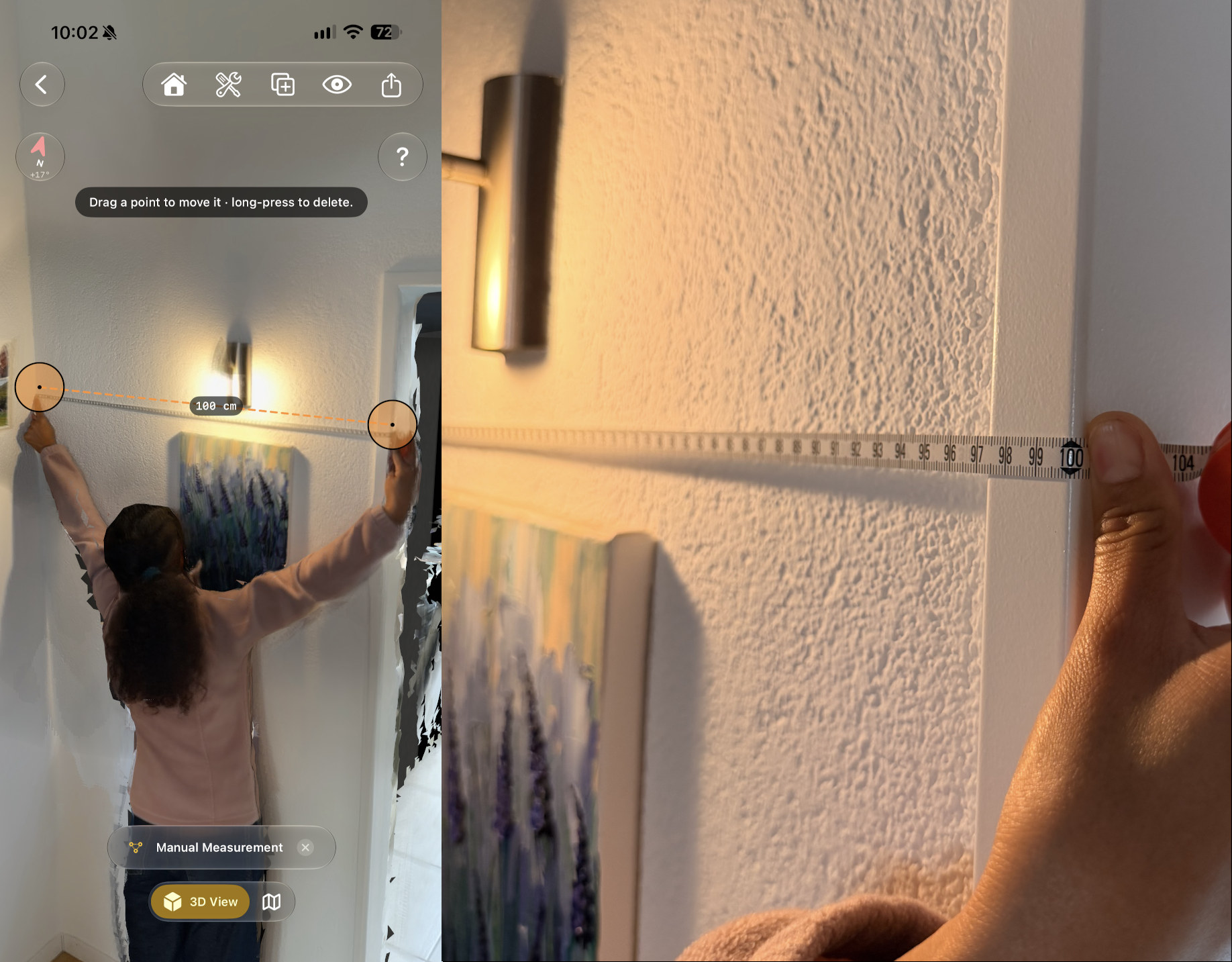
That is one test in a well-lit room, at close range, with a clear wall. It shows that under good scan conditions the measurements should be fairly accurate, not that every scan will match a tape to the centimetre. Expect a few centimetres either way, more when the conditions above work against you.
If your own checks agree within a few centimetres, the rest of the scan made the same way will usually agree too. If they do not, the cause is almost always one of the conditions in the previous section. The live coverage feedback in FloorLens flags areas that need another pass while you are still in the room, which is the cheapest moment to fix them.
LiDAR scan, Measure app or laser measure?
They solve different problems. Apple's Measure app uses the same sensor but gives you one distance at a time, and Apple calls its measurements approximate. A laser distance meter gives you one distance at a time, very precisely. A LiDAR room scan gives you every wall, door, window and ceiling height at once, at a few centimetres, plus a floor plan and a 3D model you can share.
For most homes the sensible combination is a scan for the whole space and a tape or laser for the two or three dimensions that have to be exact. That is how architects and renovators use a scan on a first site visit: the scan captures the as-built state in minutes, and the critical dimensions are checked by hand. For real estate agents the scan alone is usually enough, because a listing plan is for orientation, not construction.
If you are choosing an app, the comparison of iPhone 3D room scanning apps covers which ones use LiDAR and which reconstruct rooms from photos, a technique that works on any phone but is a different trade-off. To see what a finished scan looks like, read how to make a floor plan from an iPhone LiDAR scan.
When to call a surveyor
A phone scan is the fast way to know a space well enough to plan, advertise or quote. It does not replace a professional measurement where the number has legal or financial weight. Call a surveyor or a certified measurer when:
- a sale or lease contract states a floor area;
- a valuation, a mortgage, a tax assessment or a planning application depends on the figure;
- a national rule defines how the area must be measured and by whom;
- you are making structural changes.
For everything before that point, the scan you can make in a few minutes with the phone in your pocket is usually accurate enough, and you can check that yourself with a tape measure in the time it takes to read this paragraph.
Frequently asked questions
Is iPhone LiDAR accurate enough for a floor plan?
Yes, for listings, rental adverts, furniture planning and renovation quotes. A room scan is typically within a few centimetres across a room. It is not survey-grade, so it is not enough for contracts, valuations or official filings.
How accurate is iPhone LiDAR in centimetres?
A 2021 study in Scientific Reports measured the iPhone 12 Pro and iPad Pro at about ±1 cm on objects larger than 10 cm and about ±10 cm on a 130-metre stretch of coastal cliff. Accuracy falls with distance, so close-range room scans do better than large outdoor ones.
What makes a LiDAR scan less accurate?
Distance from the surface, full-height mirrors and glass, very dark surfaces, ceilings beyond the sensor's range, moving too fast, and very long scans. Apple names mirrors, glass, dark surfaces and high ceilings as the hard cases for its RoomPlan scanning framework.
How far can iPhone LiDAR measure?
Up to 5 metres. Apple gives that range, and the depth readings apps receive stop at 5 metres, through RoomPlan and through ARKit depth alike. Accuracy also falls with distance, so walk close to far walls instead of scanning them from across the room.
Is an iPad Pro more accurate than an iPhone for LiDAR?
The 2021 Scientific Reports study found no difference between the iPhone 12 Pro and the iPad Pro in emitted points, point density or focal length. How you scan matters more than which of the two devices you use.
Can I use the area from a phone scan in a sale or lease contract?
No. Areas from a phone scan are estimates and not legally binding. Where a contract or a regulation needs a certified area, use a qualified surveyor or measurer.
See how accurate your own scan is
FloorLens is free to scan, measure and export, no account required. iPhone & iPad with LiDAR, iOS 26+.
Download on the App Store