A floor plan app for real estate agents: from viewing to listing the same day

A floor plan app for real estate agents has one job: get a correct, readable plan into the listing on the day you visit the property, without booking anyone or waiting for a file to come back. On an iPhone or iPad with LiDAR, that means scanning the property while you are there for the photos, correcting the plan on the spot, and exporting it as an image or PDF for the portal, with a 3D tour link next to it. This guide covers what a listing needs from a floor plan, a same-day workflow, and where each piece goes in the listing.
What a listing needs from a floor plan
Photos show what a room looks like. The plan answers what photos cannot: how the rooms connect, which way they face, and how big they are. A buyer uses it to decide whether the property is worth a viewing, so the plan has to be right on a few things before it is pretty.
- The layout. Every room in the right place, with doors and openings where they really are, so the flow from the entrance to the kitchen and the bedrooms is clear.
- Room names and sizes. Each room labelled, with its length × width or its area. That is what a buyer checks against their furniture.
- A total floor area in the standard your market quotes. Gross Living Area under ANSI Z765 in the United States, Gross Internal Area in the United Kingdom, Wohnfläche in Germany, and so on. A total that follows no standard invites questions at the viewing.
- Orientation. A north arrow tells a buyer which rooms get the morning or the evening sun.
- Doors and windows. Where the light comes in, and which way a door swings when you are planning where a bed or a wardrobe goes.
- One plan per floor for a house, labelled so the buyer knows which is which.
A plan that is clean, legible on a phone and consistent with the listing text does more than an elaborate one. Furniture symbols and colour are optional; a wrong wall or a missing room is not.
Three ways to get a floor plan for a listing
| Tape measure and drawing | Plan drawing or scanning service | LiDAR scanning app | |
|---|---|---|---|
| Who measures | You | The service, on site or from your data | You, by walking through with the phone |
| When the plan is ready | When you have drawn it | When the service delivers | When the scan ends |
| Extra equipment | Laser measure, drawing software | None for you | An iPhone or iPad with LiDAR |
| Best for | A single small flat, occasionally | Surveyed or highly finished plans | Plans and 3D tours for most listings, the same day |
A professional service is the right call when the plan must be surveyed, or when a listing needs a drawn presentation that a phone scan will not give you. For everyday listings, a scanning app removes the step where you wait. If you want to compare scanning apps by name, see the best iPhone 3D room scanning apps and FloorLens compared with Matterport, CubiCasa and magicplan.
A same-day workflow: scan during the photo shoot
This is the workflow with FloorLens, which needs an iPhone 12 Pro or a later Pro or Pro Max model, or an iPad Pro from 2020 or later, running iOS 26 or later. Scanning, measuring and every export are free.
- Scan before or after the photos. Walk each room slowly along the walls with the phone held up. The app flags areas that need another pass while you are still in the room, so you do not find a gap back at the office.
- Take the listing photos inside the scan if you want them in the tour. Photos taken during the scan are pinned in the 3D model at the position they were taken.
- Scan each floor as its own level. For a house, tap the Plus button in the top bar, then "New level", and scan the next floor. Afterwards, rotate and move the new level into place while you look at the whole house. Stairs are captured roughly and may need adjusting by hand.
- Check the plan before you leave. The floor plan is ready as soon as the scan ends, with no upload and no waiting step. Compare it with the rooms in front of you: move or resize a wall the scan got wrong, turn a window that is really a door into a door, set the swing direction.
- Label the rooms and add the property details. Room names, notes, the address, the price and the number of bedrooms.
- Choose the floor area standard for your country, so the total matches what your listing form asks for.
- Export and share. The plan as an image or a PDF for the portal and the brochure, and the scan as a web link and QR code for the 3D tour. Both are covered below.
The step-by-step scan, with what the plan looks like and how to edit it, is in how to make a floor plan from an iPhone LiDAR scan. Houses over several floors get their own guide in how to scan a whole house with an iPhone.
What the measurements are good for
Wall lengths, room areas, ceiling heights and room length × width are measured automatically, and a LiDAR scan is typically within a few centimetres across a room. That is enough for a listing plan, and it is not a survey. The sensor's depth readings stop at 5 metres, so in a large open-plan room walk towards the far wall rather than scanning it from across the room. What affects accuracy, and how to check a scan with a tape measure, is in how accurate iPhone LiDAR is.
Floor areas from a phone scan are estimates, not a surveyed measurement, and not legally binding. Where your market regulates how living area is measured or disclosed, have the figure confirmed by a qualified surveyor before it goes on a listing, and do not use scan figures for contracts, valuations or official filings.
Where the plan and the 3D link go in a listing
One scan gives you several outputs. Each has a place where it does the most work.
The portal listing
Export the floor plan as a JPG or PNG and upload it where the portal takes a floor plan, usually alongside the photos. Check the portal's own guidance for image size and format. If the portal has a field for a virtual tour link, paste the scan's web link there; if it does not, put it in the description as "View the 3D tour".
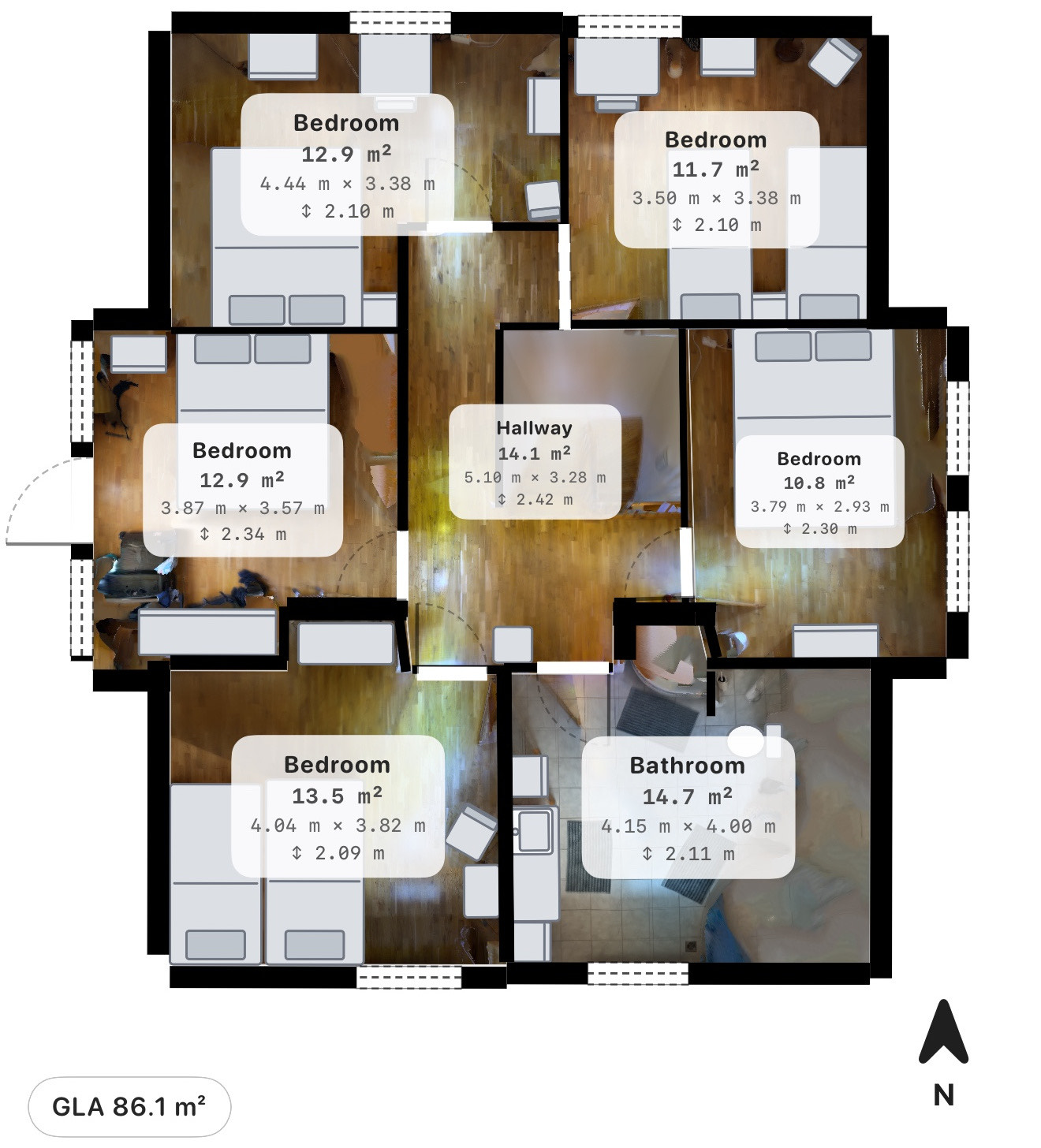
Expect the total and the room labels to disagree. Gross Living Area is measured to the outside face of the exterior walls, while each room label shows the area inside the room, and the standard leaves out floor where the ceiling is too low. Fannie Mae's Selling Guide section on the appraisal report requires appraisers to use ANSI Z765 and to report finished area that misses its ceiling height requirements separately. A loft bedroom under a sloping roof can therefore count for less than its floor. If a buyer adds up the rooms, that is the explanation.
The brochure and the email to a buyer
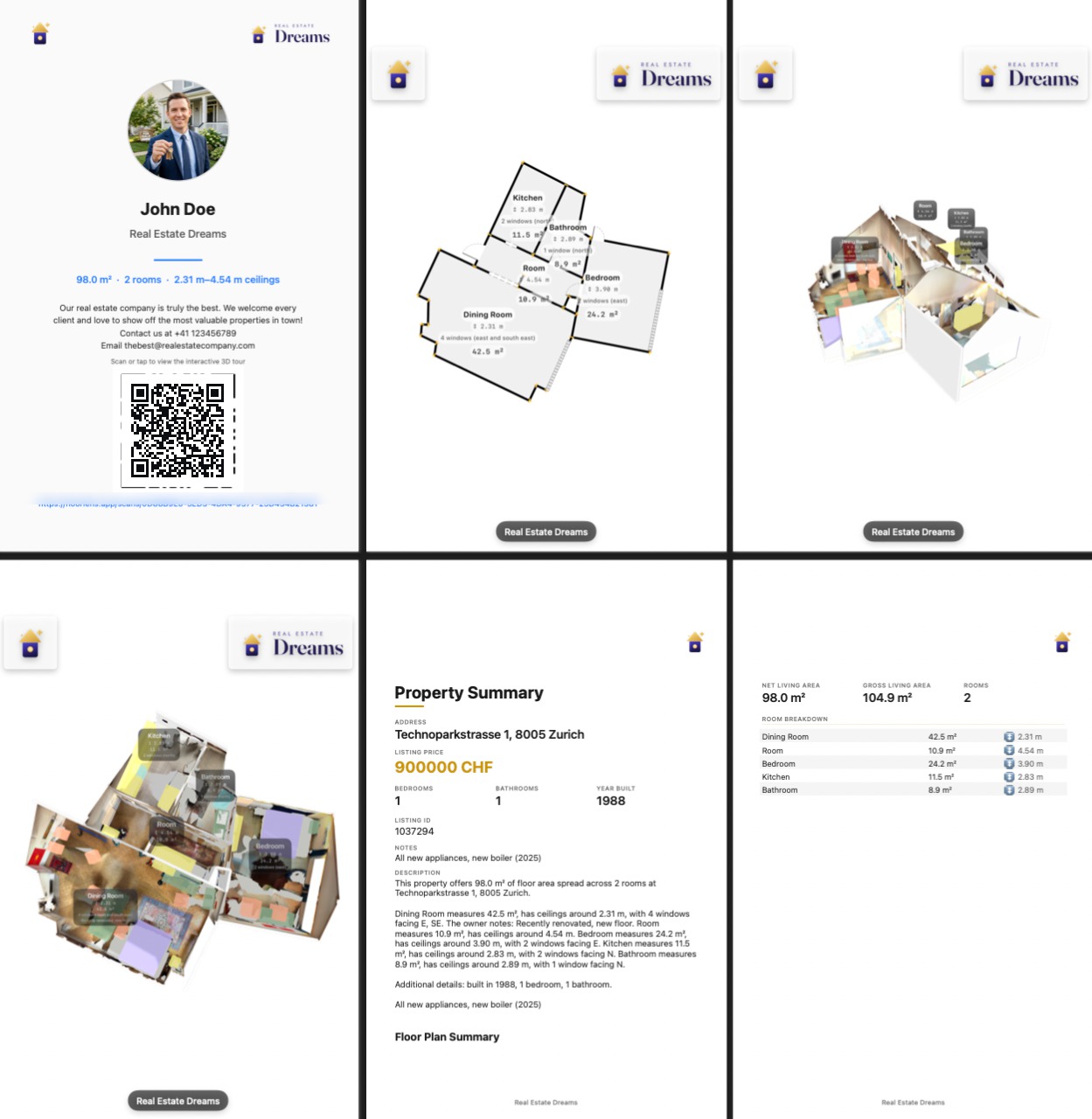
The PDF export carries the floor plan with its measurements and the property information, and always the scan's web link and QR code, so a printed brochure leads straight to the 3D tour. On Premium, the PDF is personalised with your logo, agency name and description, so the brochure a buyer forwards carries your name.
The window card, the flyer and the viewing
Every shared scan has a QR code as well as a link. Printed on a window card or a flyer, it takes someone standing on the pavement straight into the 3D tour, in their browser, with no app and no login. The tour has dollhouse, floor plan and first-person photo modes, on a phone or a laptop, and on paid plans it carries your agency's branding, as the PDF does. How sharing works, and what the buyer sees, is in how to share a 3D home tour link.
Social media
The fly-through video export is an MP4 in which the camera moves through the model and fades into the scan photos, and it ends with key figures and a QR code. It is made for the places where a link is not clickable but a video plays.
Plan the life of the tour link
Shared links are unlisted and expire automatically, which matters to an agent with several listings at once. On the free plan one scan can be shared on the web at a time, and it is deleted after 14 days. Premium, at $6.99 a month, keeps up to 3 scans on the web with 90-day links; Professional keeps up to 30, each live for 180 days. Match the plan to the number of listings you have live and to how long a listing usually stays on the market; the details are on the pricing section. If a listing outlives its link, upload the same scan again: the link renews and stays the same, so the QR codes already printed on flyers and window cards keep working. The exports (plan, PDF, 3D model, video) are yours to keep whatever the plan.
Each shared scan also shows a view count and the time it was last viewed. That tells you which listings are drawing attention, and whether the buyer who promised to look at the tour that evening actually opened it.
If you use FloorLens across your agency, the FloorLens page for real estate agents shows the whole workflow in one place.
When a phone scan is not the right tool
- Regulated area figures. Where a law or a portal rule says how area must be measured for a sale or a lease, the scan is a starting point and a surveyor signs off the number.
- Plans for building work. A buyer's architect will want to measure the critical dimensions themselves; the scan's 3D model is still a useful starting point for them.
- Very large, open or glazed spaces. Walls beyond 5 metres, big windows and mirrors make a scan harder. Walk closer and check the result against a tape measure.
- No LiDAR device. Non-Pro iPhones, the iPad Air and the iPad mini have no LiDAR sensor, and FloorLens has no Android version.
For most listings, though, the plan buyers need is one you can make yourself, in the property, on the day you take the photos.
Frequently asked questions
What is the best floor plan app for real estate agents?
The one that gets a correct plan into the listing on the day you visit. A LiDAR scanning app such as FloorLens measures the property while you walk through it and has the plan ready when the scan ends; a drafting service is the better choice when you need a surveyed or hand-drawn plan.
Can I make a floor plan for a listing with my iPhone?
Yes, if it has a LiDAR sensor: an iPhone 12 Pro or a later Pro or Pro Max model, or an iPad Pro from 2020 or later. FloorLens needs iOS 26 or later and is free to scan, measure and export.
Are floor areas from a phone scan accurate enough for a listing?
They are typically within a few centimetres across a room, which suits a listing plan. They are estimates, not a survey, and not legally binding, so where your market regulates how area is measured or disclosed, have the figure confirmed by a qualified surveyor.
How do buyers open the 3D tour?
From a link or a QR code, which FloorLens also prints on the PDF. The tour opens in the browser on a phone or laptop, with no app and no login. The link expires automatically, and uploading the same scan again renews it under the same address.
Scan your next listing during the photo shoot
FloorLens is free to scan, measure and export, no account required. iPhone & iPad with LiDAR, iOS 26+.
Download on the App Store