
How to add a virtual tour to a rental listing

A virtual tour on a rental listing is a link that lets applicants walk through the flat in their browser before they ask to see it. You can make one yourself: scan the flat with a LiDAR iPhone, share the scan as a 3D tour, and put the link and its QR code in the advert next to the floor plan. This guide covers what renters want to see, how to make the tour, where it goes in the advert, and how to keep it online until the flat is let.
What a virtual tour does for a rental listing
Most of the messages a rental advert brings in ask the same few things. How big is the bedroom? Does a double bed fit with room to walk around it? Is the kitchen separate? Where is the bathroom in relation to the bedrooms? Photos rarely answer these, because a wide-angle photo shows what a room looks like, not how the rooms connect or how large they are.
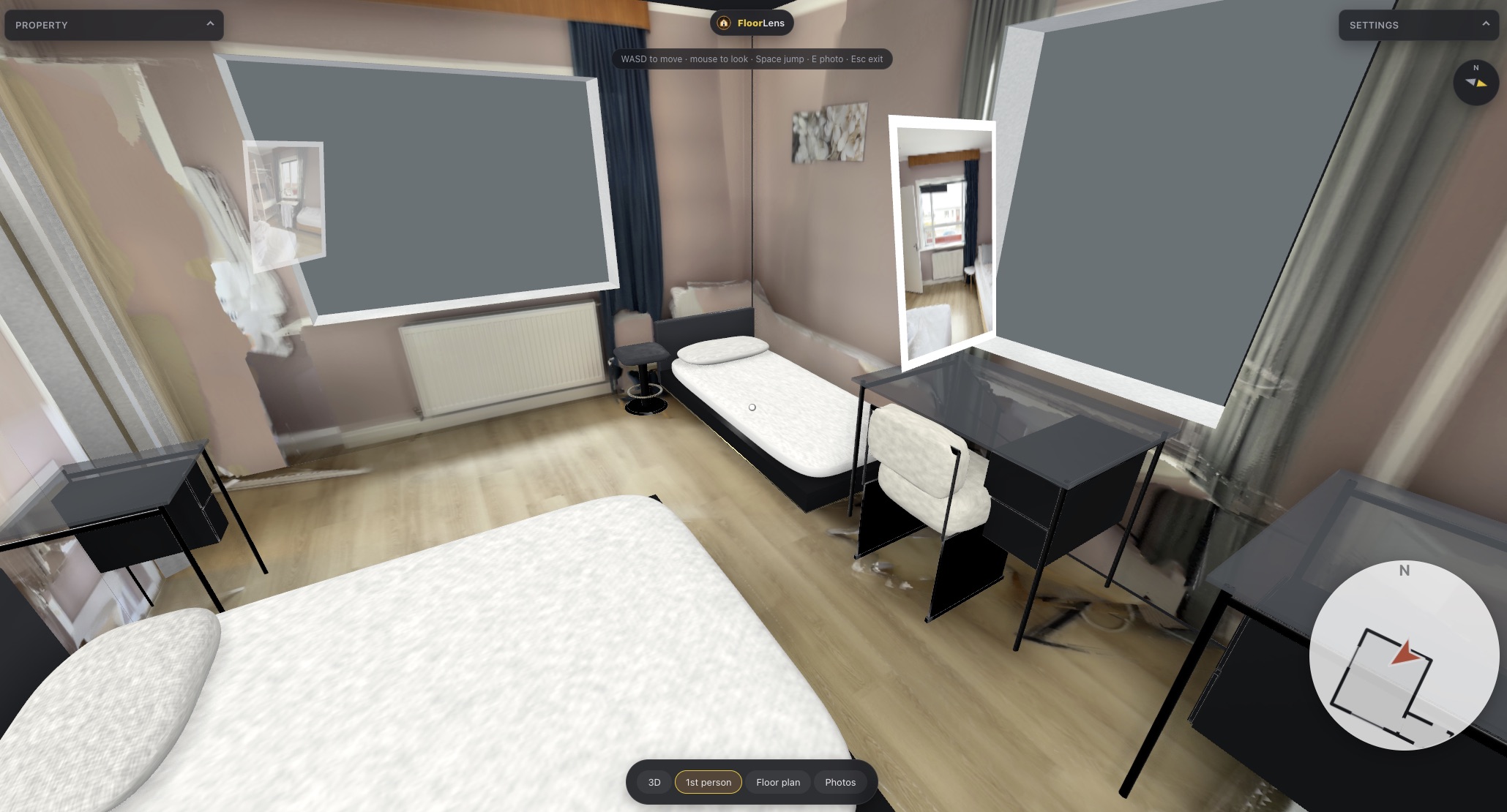
A 3D tour with a floor plan answers them before anyone writes. Applicants can orbit the whole flat as a dollhouse, read the room sizes off the plan, and look at the photos you took, each pinned where it was taken. The people for whom the flat was never going to work stop there. The ones who book a viewing already know the layout fits them.
It will not replace the viewing for most applicants, and it should not try to. What it changes is who comes to the viewing. That is the point the FloorLens page for landlords makes: a better advert saves you evenings spent showing a two-room flat to people who needed three.
What renters want to see before a viewing
A rental tour is not a sales brochure. Renters are checking whether their life fits into the space, so scan and photograph with their questions in mind:
- The layout. Which rooms open off which, whether the living room is a corridor to the bedroom, how far the bathroom is from the bedrooms. The dollhouse and the floor plan show this at a glance.
- Room sizes. Wall lengths, room areas and ceiling heights are measured from the scan, so an applicant can check a sofa or a wardrobe against the plan. How measuring a room with an iPhone works explains where these figures come from.
- Storage. Built-in cupboards, a cellar compartment, space for a bike. Take a photo of each during the scan so it is pinned in place.
- Kitchen and bathroom. Appliances, the shower or bath, the condition of the surfaces. These are the rooms people look at longest, so photograph them well.
- Windows and light. Where the windows are and which way they face. FloorLens aligns the scan to magnetic north, so the plan shows the orientation of every room.
The floor area is reported in your country's standard, for example Wohnfläche in Germany or Gross Internal Area in the UK, so the size in the advert is measured the way your market expects.
Areas from a phone scan are estimates, not a survey, and not legally binding. Where a lease or a regulation needs a certified area, use a qualified measurer.
How to make a virtual tour of a rental with an iPhone
You need an iPhone or iPad with a LiDAR sensor (iPhone 12 Pro or a later Pro or Pro Max, or an iPad Pro from 2020 on) running iOS 26 or later. Scanning, measuring, the floor plan and every export are free.
- Prepare the flat. Tidy, open the internal doors, switch on the lights and put away anything personal. If someone still lives there, agree the scan with them first: the photos and the 3D model show everything in the rooms.
- Scan every room. Walk through the flat with FloorLens and stay close to the walls. The app flags areas that need another pass while you scan. Take photos of what applicants will ask about as you go: the hob, the shower, the cupboards, the view.
- Check and label the plan. The floor plan is ready when the scan finishes. Fix any wall or door the scan got wrong, name the rooms, and add the property details such as the address, the rent and the number of bedrooms.
- Share the scan to the web. Sharing needs a FloorLens account. You get a link and a QR code that open the 3D tour in any browser, with dollhouse, floor plan and first-person photo modes.
- Add the link to the advert. Put the link in the advert and in your reply to enquiries, and attach the PDF floor plan, which always carries the same link and QR code.
If accuracy worries you, how accurate iPhone LiDAR is covers what a few centimetres of error means for a floor plan and what makes a scan better or worse.
Where to put the link and the QR code
- In the advert. If the listing portal has a field for a virtual tour or video link, use it. Otherwise put the link in the description, if the portal's rules allow links there.
- In your reply to enquiries. Keep a short reply with the tour link and the PDF floor plan ready. Many questions answer themselves once the applicant has walked the tour.
- On paper. A notice in the building's entrance or a flyer can carry the QR code, which opens the tour straight from the phone camera. How to use a QR code on a property flyer covers size and placement.
- On the PDF. The exported floor plan PDF always carries the tour's link and QR code, so anyone you send the plan to can open the tour from it.
Applicants open the link on whatever they are holding, Android phones included. How to share a 3D home tour link goes through the sharing step and what the viewer shows in more detail.
Keeping the tour online until the flat is let
Shared links are unlisted and expire automatically, which suits a rental: once the flat is let, the tour disappears without you having to remember it. How long a link lasts depends on the plan (see FloorLens pricing):
- Free: one scan shared on the web at a time, deleted after 14 days. That covers the first two weeks of an advert.
- Premium: up to 3 scans on the web, with 90-day links, from $8.00 a month in the US. Premium plans include a free trial.
- Professional: up to 30 scans on the web, with 180-day links, for someone managing many units.
If the advert runs longer than the link, share the same scan again. Re-uploading renews the link and keeps the same URL, so the QR codes already printed and the link already in the advert keep working. Each shared scan also shows a view count and when it was last viewed, which tells you whether applicants are opening the tour at all. On every Premium plan, and on Professional, the tour carries your own branding, as the PDF does.
Nothing leaves the phone until you share a scan, and you can delete an uploaded scan from the cloud at any time in the app. The details are in Swiss privacy by design.
What a virtual tour does not show
A scan captures the space, not everything about living in it. It does not show noise from the street or the neighbours, how the light changes through the day, the smell of the stairwell or the state of the building's shared areas unless you scan them too. Say so in the advert where it matters, and keep the viewing for those things.
A phone scan is also not the only way to put a tour on a listing. If you want polished marketing photography and a professionally produced tour for a high-end let, a property photographer is the better choice. A simple video walkthrough filmed on any phone is better than nothing for a flat you cannot scan. A LiDAR scan is the option that gives you the measured floor plan and the 3D tour from the same few minutes on site.
The same scan can also serve as a dated record of the flat's condition at handover, with photos pinned where they were taken. How to record a flat's condition at move-in with a 3D scan covers what that record is good for and what it does not replace.
Frequently asked questions
Do applicants need an app or an account to open the tour?
No. The tour is a web link that opens in the browser on any phone, tablet or laptop, Android included. Only the person who shares the scan needs a FloorLens account.
What happens if the shared link expires before the flat is let?
Share the same scan again. Re-uploading a scan renews its link, and the link stays the same, so the URL and QR code already in your advert keep working.
Can I scan a flat while the current tenant still lives there?
Technically yes, but agree it with the tenant first and give them the chance to put personal things away, because the photos and the 3D model show everything in the rooms. An empty, clean flat also scans and presents better.
Can I put the floor area from the scan in the advert?
As a guide, yes, measured in your country's standard. It is an estimate from a phone scan, not a survey, and not legally binding, so do not use it where a lease or a regulation needs a certified area.
Scan your rental this weekend
FloorLens is free to scan, measure, export and share one tour. iPhone & iPad with LiDAR, iOS 26+.
Download on the App Store